How to Add a Geometric Optics Ray Diagram Simulator to Your Website
LK Forge · 4 min read · Updated September 2026
You can add a full geometric optics ray diagram simulator to any website, blog, or classroom page with a single line of code — free, with no sign-up, no plugin, and no script to install. Visitors pick a lens or mirror, drag the object, and watch the principal rays build a real or virtual image. This guide covers the fastest way to embed the Geometric Optics Simulator, what it teaches, and where it works.
The quickest way: paste one embed snippet
An embed is just an <iframe> that loads the simulator from lkforge.com, plus a small credit line. Copy this into your page’s HTML where you want the widget to appear:
<iframe src="https://lkforge.com/embed/geometric-optics/"
        width="100%" height="900" loading="lazy"
        style="border:0;max-width:560px"
        title="Geometric Optics Ray Diagram Simulator by LK Forge"></iframe>
<p><a href="https://lkforge.com/tools/physics/geometric-optics/">Geometric Optics Ray Diagram Simulator</a>
   by <a href="https://lkforge.com/">LK Forge</a></p>
The <iframe> is the live simulator; the <p> underneath is a plain credit link. Keep that line — the visible link is what keeps the widget free to embed. You can also copy this exact code straight from the LK Forge widget gallery.
What the widget shows
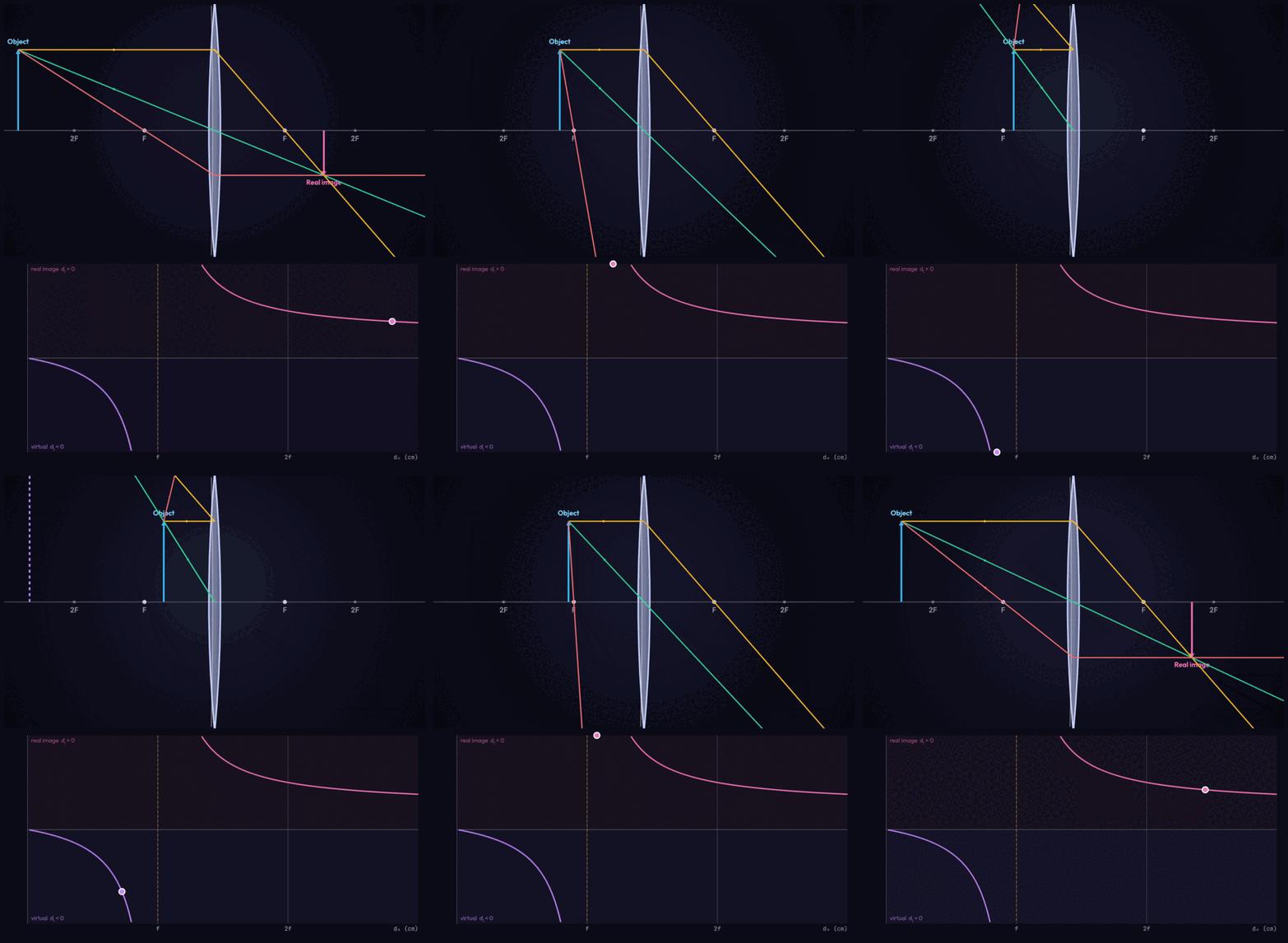
The simulator opens with an object beyond a converging lens, so a visitor sees a real inverted image immediately and can then take control:
- Optical element: switch between a converging lens, a diverging lens, a concave mirror and a convex mirror.
- Object distance and height: drag the object along the axis or use the sliders to move it inside or beyond the focal points.
- Principal rays: the three known rays are drawn to the point where they meet, with dashed back-extensions for virtual images.
- Live image data: image distance, magnification, and whether the image is real or virtual, upright or inverted, enlarged or reduced.
Pick the right height
The snippet uses height="900", which fits the ray diagram, the element menu, the sliders, the toggles and the readouts without clipping even on a narrow phone, where they stack into one column. On a wider page the widget centres within its max-width:560px. That single height works across screen sizes, so there is nothing to tweak for mobile.
Where it works
Because it is a standard iframe, the embed works anywhere you can add HTML:
- WordPress: add a Custom HTML block and paste the snippet.
- Squarespace: use a Code / Embed block.
- Wix: add an Embed HTML / iframe element.
- Ghost: insert an HTML card.
- Notion: paste the
/embed/geometric-optics/URL and choose "Create embed". - Plain HTML, an intranet, or a lesson page: paste the snippet straight into the markup.
That’s the whole job. Copy the embed code from the widget gallery and paste it wherever a physics lesson or a blog post on lenses, mirrors or ray diagrams needs an image students can actually build.
Grab the embed code from the LK Forge widget gallery — free, no sign-up.
Open the Geometric Optics SimulatorFrequently asked questions
- Is embedding the ray diagram simulator free?
- Yes. It is free to embed on any site, with no account, no API key and no usage limits. The whole simulation runs in your visitor’s own browser, so there is no server cost — we only ask that you keep the small "Geometric Optics Ray Diagram Simulator by LK Forge" credit line that comes with the embed code.
- What can visitors do with the embedded simulator?
- They can choose a converging or diverging lens, or a concave or convex mirror, then drag the object along the axis or use sliders to set the object distance, height and focal length. The tool draws the three principal rays and places the image in real time, and a live panel reports the object distance, image distance, focal length, magnification and whether the image is real or virtual, upright or inverted, enlarged or reduced.
- Does the embed teach the thin-lens and mirror equation?
- Yes. The image is solved straight from 1/f = 1/do + 1/di with magnification m = -di/do, so students can match the ray diagram they see to the equation. Moving the object inside the focal length flips a converging lens into a magnifier with an upright virtual image, and placing it beyond the focal point gives a real, inverted image — the sign of the numbers changing exactly as the rays cross or diverge.
- What iframe height should I use, especially on mobile?
- The snippet ships with height="900", which is tall enough that the ray diagram, the element menu, the three sliders, the toggles and the readouts all fit without clipping even on a narrow phone where everything stacks into a single column. On a wider page the widget simply centres within its max-width of 560px. If you want it shorter you can lower the height, but 900 is the safe default across screen sizes.
- Where can I embed it — WordPress, Wix, Squarespace, Notion?
- Anywhere you can add HTML, because it is a standard iframe. In WordPress use a Custom HTML block; in Squarespace a Code/Embed block; in Wix an Embed HTML element; in Ghost an HTML card; in Notion paste the /embed/geometric-optics/ URL as an embed. On a plain HTML page or an intranet, paste the snippet straight into the markup.
- Does the embedded simulator track visitors or set cookies?
- No. Everything runs locally in the visitor’s browser — nothing is uploaded. The embed sets no tracking cookies and sends no analytics, so it is safe to place on a privacy-sensitive site, an intranet, or a page for students.